9주 차까지 오는 시간 동안 내가 느낀 점은 티스토리에 봇으로 의심되는 댓글이 너무나 많다는 것이다.
그래서 자바스크립트 공부도 할 겸, 한 가지 방안을 생각해 봤다.
바로 댓글 작성까지의 체류 시간 타임스탬프 기능을 추가하는 것이다.
봇은 보통 페이지 로드 후 즉시 댓글을 제출하기 때문에, 페이지 로드부터 댓글 제출까지의 시간을 측정한다면 그것이 사람이 직접 쓴 댓글인지, 아니면 봇이 작성한 댓글인지 알 수 있다는 것이다.
이 방식을 사용하면 봇이 아닌 사람이 직접 작성했다고 하더라도 정말로 포스트 글을 제대로 읽고 썼는지 아니면 바로 댓글만 쓰고 갔는지도 판단할 수 있다. 솔직히 이 글을 아무리 빠르게 속독한다고 해도 1분은 걸릴 것이라 예상하기 때문에, 대략 30초 내외 작성을 기준으로 잡으면 적당할 것 같다.
*아쉽게도 웹이나 모바일 접속이 아닌 티스토리 기본 모바일 앱 안에서는 해당 기능이 작동하지 않으므로, 앱의 네이티브 댓글 작성 화면에서 작성된 댓글은 ID가 기록되지 않아 봇인지 아닌지 판별할 수가 없다.
[목차여기]
준비 단계
01. 저장소 만들기 (구글 스프레드 시트)
왜 저장소를 만들어야 하느냐?
봇 의심 댓글 작성자가 직접 삭제하기 전까지 스팸 의심 마크가 반영구적으로 모든 유저에게 노출되려면 어딘가에 그 로그가 저장되어야 한다. 하지만 티스토리 서버에는 직접 접근이 불가하기에, 따로 저장소를 구축해야 한다.
찾아보니, 웹 앱에서 Sheets를 간단 DB로 활용할 수 있는 방법이 있다.
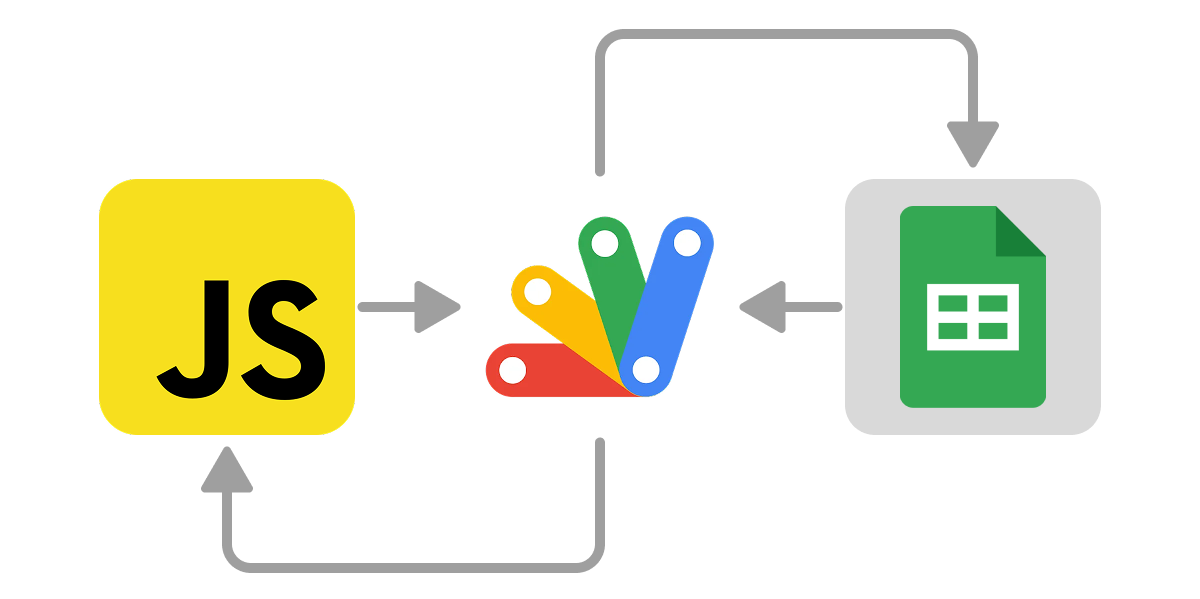
JavaScript는 커스텀 스킨 HTML 편집에서 진행하면 되니, 준비물은 구글 스프레드 시트와 구글 Apps Script 두 가지이다.

보이는 것처럼 나는 suspects라는 이름의 시트를 새로 제작하여, [A열: postPath / B열: commentId / C열: dwell / D열: createdAt]를 넣었다.
- dwell: 체류 시간, 즉 [현재 시간 - startTime /1000] 해서 초 단위로 변환한 값을 뜻함
JS에서는 흐른 시간을 밀리초(ms) 단위로 반환한다.
밀리초(ms) = 1/1000초이기 때문에 초(second) 단위로 바꾸려면 1000으로 나눠야 한다.
이제 하단 행은 내 게시글에 댓글이 달리면 서버를 통해 그 로그 데이터가 자동으로 채워질 것이다.
로그 데이터 상한은 따로 두지 않을 예정이다.
열을 다 채워 넣었으면, 스프레드시트 상단 메뉴 → 확장 프로그램 → Apps Script을 실행한다.
02. 서버 제작 (GAS)
구글 스프레드 시트를 백엔드로 사용하는 웹 API를 구현할 것이다.
'suspects' 시트 속 포스트 경로(postPath), 댓글 ID(commentId), 체류 시간(dwell)을 저장/관리하며, 토큰 기반 인증을 사용한다.
페이지에 기본으로 있는 function myFunction(){} 코드는 삭제하고, 아래와 같이 코드를 구성해야 한다.
const SHEET_ID   = '...';      // 대상 스프레드시트 ID (공유 링크에서 d/ 와 /edit 사이에 있는 문구가 ID이다.)
const SHEET_NAME = 'suspects'; // 사용할 시트 이름
const TOKEN      = '***'; // 쓰기 인증 토큰
설정: SHEET_ID / SHEET_NAME('suspects') / TOKEN 지정
/* 유틸 함수 */
function ensureSheet_() {
  const ss = SpreadsheetApp.openById(SHEET_ID);
  let sh = ss.getSheetByName(SHEET_NAME);
  if (!sh) {
    sh = ss.insertSheet(SHEET_NAME);
    sh.getRange(1,1,1,4).setValues([['postPath','commentId','dwell','createdAt']]);
  }
  return sh;
}
function normalize_(p){
  p = String(p || '');
  p = p.replace(/^\/m\//,'/').replace(/\/amp\/?$/,'').replace(/\/+$/,'');
  return p || '/';
}
function jsonpOut_(cb, data) {
  const text = cb ? `${cb}(${JSON.stringify(data)})` : JSON.stringify(data);
  return ContentService.createTextOutput(text)
    .setMimeType(cb ? ContentService.MimeType.JAVASCRIPT : ContentService.MimeType.JSON);
}- ensureSheet_(): 시트가 없으면 생성하고 헤더 설정 (postPath, commentId, dwell, createdAt)
- normalize_(p): URL 경로 정규화 (예: /m/ 제거, trailing 슬래시 제거)
- jsonpOut_(cb, data): JSON 또는 JSONP 형식으로 응답 출력
/* 엔드포인트 */
function doGet(e) {
  const p = e && e.parameter ? e.parameter : {};
  const action = String(p.action || 'read').toLowerCase();
  const cb = p.callback;

  try {
    // unknown_action 방지
    if (action === 'diag') {
      const ss = SpreadsheetApp.openById(SHEET_ID);
      const sh = ensureSheet_();
      return jsonpOut_(cb, { ok:true, ssName:ss.getName(), sheet:sh.getName(), time:new Date().toISOString() });
}- 엔드포인트 (doGet(e)): GET 파라미터(action)에 따라 동작
- 'diag': 스프레드시트/시트 상태 확인 (진단용)
// 1) 쓰기
    if (action === 'write') {
      if (p.token !== TOKEN) return jsonpOut_(cb, { ok:false, error:'unauthorized' });

      const postPath  = normalize_(p.postPath);
      const commentId = String(p.commentId || '');
      const dwell     = Math.max(1, Number(p.dwell || 0));

      if (!postPath || !commentId) return jsonpOut_(cb, { ok:false, error:'bad_request' });

      const sh = ensureSheet_();
      const rows = sh.getDataRange().getValues();

      for (let i=1;i<rows.length;i++){
        if (normalize_(rows[i][0])===postPath && String(rows[i][1]||'')===commentId) {
          const cur  = Number(rows[i][2])||0;
          const next = Math.max(cur, dwell);
          if (next !== cur) sh.getRange(i+1, 3).setValue(next);
          sh.getRange(i+1, 4).setValue(new Date());
          return jsonpOut_(cb, { ok:true, updated:true, dwell: next });
        }
      }
      sh.appendRow([postPath, commentId, dwell, new Date()]);
      return jsonpOut_(cb, { ok:true, inserted:true, dwell });
    }

// 2) 읽기
    if (action === 'read') {
      const postPath  = normalize_(p.postPath);
      const withDwell = p.withDwell === '1' || p.withDwell === 'true';
      const sh = ensureSheet_();
      const rows = sh.getDataRange().getValues();
      const filtered = rows.slice(1).filter(r => normalize_(r[0]) === postPath);
      const out = withDwell
        ? filtered.map(r => ({ id:String(r[1]), dwell:Number(r[2])||0 }))
        : filtered.map(r => String(r[1]));
      return jsonpOut_(cb, out);
}- 'write': 토큰 검증 후, postPath+commentId 기준으로 dwell up/sert (기존 있으면 최댓값 업데이트 / 없으면 삽입). createdAt 갱신 (new Date())
- 'read': postPath로 필터링해 commentId 목록 반환 (withDwell=1 시 dwell 포함) 각 댓글 ID와 함께 해당 dwell(체류 시간) 값을 포함하여 출력
// 중복 행 제거
if (action === 'dedupe') {
      if (p.token !== TOKEN) return jsonpOut_(cb, { ok:false, error:'unauthorized' });
      const sh = ensureSheet_();
      const rows = sh.getDataRange().getValues();
      const body = rows.slice(1);
      const keep = new Map();
      const purge = [];

      body.forEach((r,i) => {
        const key = normalize_(r[0])+'|'+String(r[1]||'');
        const d = Number(r[2])||0;
        if (!keep.has(key)) keep.set(key, { row:i+2, dwell:d });
        else {
          const cur = keep.get(key);
          if (d > cur.dwell) { purge.push(cur.row); keep.set(key, { row:i+2, dwell:d }); }
          else purge.push(i+2);
        }
      });
      purge.sort((a,b)=>b-a).forEach(r => sh.deleteRow(r));
      return jsonpOut_(cb, { ok:true, removed: purge.length, kept: keep.size });
    }

    return jsonpOut_(cb, { ok:false, error:'unknown_action' });
  } catch (err) {
    return jsonpOut_(cb, { ok:false, error:'server_error', detail:String(err) });
  }
}- 'dedupe': 토큰 확인 후, 중복 행 제거 (postPath+commentId 기준, 최대 dwell 유지)
- 예외 처리: unauthorized / unknown_action / server_error 등 JSON으로 응답
저장 → 배포 → 새 배포 → 유형: 웹 앱 선택 후 모든 사용자에게 액세스 권한을 부여, 나머지 채울 거 채워 넣고 최종 배포한다.
나중에 티스토리 스킨 편집 HTML 코드에 사용되니, 배포 후 나오는 웹 앱 URL을 미리 복사해 두자.
구현 로직
01. 상수(환경) 설정
const ENDPOINT  = 'GAS 웹 앱 URL';
const TOKEN     = '인증 토큰 문구';
const THRESHOLD = 30;
const DEBUG     = true;
const LEN_A=50, LEN_B=120, SNIP_LEN=60, HYDRATE_GRACE_MS=2000, WATCH_MS=30000, WATCH_IV=200, PEND_TTL_MS=10*60*1000;- 서버 엔드포인트 URL, 인증 토큰, 체류 시간 임계값(THRESHOLD=30초), 디버그 모드 등을 정의
- 추가 상수로 텍스트 해시 길이(LEN_A/B), 스니펫(Snippet) 길이, 초기 로드 유예 시간(HYDRATE_GRACE_MS), 감시 간격(WATCH_MS/IV), 펜딩 TTL 등을 설정
02. 유틸 함수
const log=(...a)=>{ if(DEBUG) console.log('[SUSPECT]',...a); };
const norm=s=>(s||'').replace(/\s+/g,' ').trim().toLowerCase();
const hash=s=>{ let h=0; for(let i=0;i<s.length;i++){ h=((h<<5)-h)+s.charCodeAt(i); h|=0; } return Math.abs(h).toString(36); };
const qs=o=>Object.entries(o).map(([k,v])=>`${encodeURIComponent(k)}=${encodeURIComponent(v)}`).join('&');

function jsonp(url, params={}, timeout=7000){
  return new Promise((resolve,reject)=>{
    const cb='__SUS_CB_'+Date.now().toString(36)+Math.random().toString(36).slice(2);
    params.callback=cb;
    const s=document.createElement('script');
    s.src=url+(url.includes('?')?'&':'?')+qs(params);
    let done=false;
    const t=setTimeout(()=>{ if(done) return; done=true; cleanup(); reject(new Error('jsonp-timeout')); }, timeout);
    window[cb]=(data)=>{ if(done) return; done=true; clearTimeout(t); cleanup(); resolve(data); };
    s.onerror=e=>{ if(done) return; done=true; clearTimeout(t); cleanup(); reject(e); };
    function cleanup(){ try{ delete window[cb]; }catch{} s.remove(); }
    document.head.appendChild(s);
  });
}- 디버그 로그(log) / 문자열 정규화(norm: 공백 제거/소문자) / 간단한 해시(hash: 문자열을 숫자로 변환) / 쿼리스트링 생성(qs)
- 주요 함수는 JSONP 방식으로 서버 요청을 처리(크로스 도메인 지원, 타임아웃 포함)
03. 경로 처리
const postPath = (()=>{ let p=location.pathname; return p.replace(/^\/m\//,'/').replace(/\/amp\/?$/,'').replace(/\/+$/,''); })();
log('postPath', postPath);- 현재 페이지 경로(postPath)를 추출하고 정규화(/m/ 또는 /amp/ 제거, trailing 슬래시 제거)
- 서버 요청 시 포스트 식별자로 사용
04. 타이밍 및 세션 관리
const VISIT_KEY=`suspect:visit:${postPath}`;
const START_KEY=`suspect:visitStart:${postPath}`;
const FI_KEY=`suspect:firstInteract:${postPath}`;
const TS_KEY=`suspect:typingStart:${postPath}`;

const VISIT_ID = sessionStorage.getItem(VISIT_KEY) || (()=>{ const id=Date.now().toString(36)+Math.random().toString(36).slice(2); sessionStorage.setItem(VISIT_KEY,id); return id; })();
const PEND_KEY = `suspect:pending:${postPath}:${VISIT_ID}`;

let visitStart=Number(sessionStorage.getItem(START_KEY))||0;
if(!visitStart){ visitStart=Date.now(); sessionStorage.setItem(START_KEY,String(visitStart)); }
window.addEventListener('pageshow',e=>{ if(e.persisted){ visitStart=Date.now(); sessionStorage.setItem(START_KEY,String(visitStart)); sessionStorage.removeItem(FI_KEY); sessionStorage.removeItem(TS_KEY); log('pageshow-reset'); } });

let firstInteract=Number(sessionStorage.getItem(FI_KEY))||0;
let typingStart=Number(sessionStorage.getItem(TS_KEY))||0;

function markFirst(){ if(!firstInteract){ firstInteract=Date.now(); sessionStorage.setItem(FI_KEY,String(firstInteract)); log('firstInteract set'); } }
function markTyping(){ if(!typingStart){ typingStart=Date.now(); sessionStorage.setItem(TS_KEY,String(typingStart)); log('typingStart set'); } }

document.addEventListener('focusin',e=>{ if(e.target && e.target.matches('#comment, textarea, input, button')) markFirst(); }, true);
document.addEventListener('pointerdown', markFirst, {capture:true});
document.addEventListener('keydown', markFirst, true);
document.addEventListener('input', e=>{
  if(e.target && e.target.matches('#comment, textarea')){ markFirst(); markTyping(); lastSnippet = norm(e.target.value).slice(0,SNIP_LEN); }
}, true);

const dwellNow = ()=>Math.max(1, Math.floor((Date.now() - (typingStart || firstInteract || visitStart || Date.now()))/1000));
function setPending(sec){ try{ localStorage.setItem(PEND_KEY, JSON.stringify({sec,exp:Date.now()+PEND_TTL_MS})); }catch{} }
function takePending(){ try{ const raw=localStorage.getItem(PEND_KEY); if(!raw) return null; const o=JSON.parse(raw); if(o && o.exp>Date.now()){ localStorage.removeItem(PEND_KEY); return Number(o.sec)||null; } }catch{} localStorage.removeItem(PEND_KEY); return null; }- 세션 스토리지로 방문 ID(VISIT_ID), 시작 시간(visitStart), 첫 상호작용(firstInteract), 타이핑 시작(typingStart)을 관리
- 이벤트 리스너로 사용자 행동(포커스, 클릭, 키다운, 입력)을 감지해 타이밍을 마크
- dwellNow로 체류 시간(dwell) 계산(타이핑 > 상호작용 > 방문 순 우선)
- 펜딩 dwell을 로컬 스토리지에 저장 및 가져오기(setPending/takePending)로 페이지 리로드 시 그 상태를 유지
05. ID 및 Key 생성
const contentKeyFromText=(text,len=LEN_B)=>'cx-'+hash(norm(text).slice(0,len));
function getPrimaryId(item){ if(!item) return null; const d=item.getAttribute('data-comment-id'); if(d) return String(d); if(item.id) return item.id; return null; }
function currentTextKey(item,len=LEN_B){ const a=norm(item.querySelector('.tt-link-user')?.textContent||''); const c=norm(item.querySelector('.tt-wrap-desc .tt_desc')?.textContent||''); return 'tx-'+hash((a+'::'+c).slice(0,len)); }
function legacyTextKey(item,len=LEN_B){ const t=norm(item.innerText||item.textContent||''); return 'tx-'+hash(t.slice(0,len)); }
function computeIdCandidates(item){
  const ids=new Set();
  const pri=getPrimaryId(item); if(pri) ids.add(pri);
  const content=item.querySelector('.tt-wrap-desc .tt_desc')?.textContent||'';
  ids.add(contentKeyFromText(content,LEN_B)); ids.add(contentKeyFromText(content,LEN_A));
  ids.add(currentTextKey(item,LEN_B)); ids.add(currentTextKey(item,LEN_A));
  ids.add(legacyTextKey(item,LEN_B));  ids.add(legacyTextKey(item,LEN_A));
  return [...ids];
}- contentKeyFromText로 텍스트 해시 키(cx-) 생성
- getPrimaryId로 데이터 속성이나 ID 추출
- currentTextKey/legacyTextKey로 텍스트 기반 키(tx-) 생성
- computeIdCandidates는 여러 후보 ID를 Set로 모아 반환(서버 매칭 시 사용)
06. 서버를 읽고 표시
async function applyServerSuspects(container){
  try{
    const data = await jsonp(ENDPOINT, {action:'read', postPath, withDwell:1, t:Date.now()});
    log('read-result-raw', data);
    const map=new Map();
    if(Array.isArray(data)){
      for(const it of data){
        if(it && typeof it==='object' && 'id' in it) map.set(String(it.id), Number(it.dwell)||0);
        else if(typeof it==='string') map.set(it,0);
      }
    }
    let hit=0;
    container.querySelectorAll('.tt-box-content').forEach(item=>{
      const cands=computeIdCandidates(item);
      let matched=false,best=0;
      for(const id of cands){ if(map.has(id)){ matched=true; best=Math.max(best, Number(map.get(id))||0); } }
      if(matched){ const dwellShown = Math.max(1, best); item.setAttribute('data-dwell', String(dwellShown)); item.classList.add('suspect'); propagateBadgeTarget(item, dwellShown); hit++; }
    });
    log('applyServerSuspects',{count:hit});
  }catch(e){ log('applyServerSuspects-error',e); }
}- 서버에서 댓글 데이터를 읽음 (read 액션, withDwell=1로 dwell 포함)
- Map으로 ID-dwell 매핑, 기존 댓글 아이템에 ID 후보 매칭 후 suspect 클래스/속성 추가 및 배지(마크)를 부여
- 페이지 로드 시 서버 데이터가 적용
07. 보조 유틸
let lastSnippet='';
function readContentSafely(){
  const app=document.querySelector('[data-tistory-react-app="Comment"]');
  const form=app?.querySelector('form');
  let txt='';

  if(form){
    try{
      const fd=new FormData(form);
      txt = (fd.get('comment') || fd.get('content') || fd.get('message') || '').toString();
    }catch{}
  }

  if(!txt){
    const ta = app?.querySelector('#comment, textarea[name="comment"], textarea, [contenteditable="true"]');
    txt = (ta && ('value' in ta ? ta.value : ta.textContent)) || '';
  }
  return txt;
}

function writeSuspectRaw(id, dwell){
  jsonp(ENDPOINT, {action:'write', token:TOKEN, postPath, commentId:id, dwell, t:Date.now()})
    .then(r=>log('write-ok(pre)',r))
    .catch(e=>log('write-fail(pre)',e));
}

function onSubmitSignal(){
  const content = readContentSafely();
  const contentTrim = norm(content);
  lastSnippet = contentTrim.slice(0,SNIP_LEN);

  const sec = dwellNow();
  setPending(sec);

  if (contentTrim.length > 0) {
    const preId = contentKeyFromText(contentTrim, LEN_B);
    writeSuspectRaw(preId, sec);
  } else {
    log('skip-prewrite(empty-content)');
  }

  log('submit-signal',{dwell:sec, snippetLen:lastSnippet.length});
  startWatcher();
}

document.addEventListener('submit', onSubmitSignal, true);
document.addEventListener('pointerup', e=>{ const t=e.target; if(t && t.closest('.tt-btn_register, .tt_btn_submit, .tt-box-write button, form button, button[type="submit"]')) onSubmitSignal(); }, true);
document.addEventListener('keydown', e=>{ const inTA=e.target && e.target.matches('#comment, textarea, [contenteditable="true"]'); if((e.ctrlKey||e.metaKey)&&e.key==='Enter') onSubmitSignal(); if(inTA && e.key==='Enter' && !e.shiftKey) onSubmitSignal(); }, true);- 댓글 내용을 안전하게 읽어 들여서(readContentSafely: FormData 또는 셀렉터) 서버에 씀(writeSuspectRaw)
- 제출 시그널(onSubmitSignal)에서 내용 스니펫을 저장하고, dwell을 계산
- 이벤트 리스너를 통해 submit, 버튼 클릭, Enter 키 등을 감지하면 startWatcher()를 호출하여 댓글 감시 기능이 작동
08. 배지 표시
function propagateBadgeTarget(item, dwell) {
  const li = item.closest('.tt-item-reply');
  if (li) { li.dataset.suspect = '1'; li.dataset.dwell = String(dwell); }

  const author = item.querySelector('.tt-box-meta .tt-link-user');
  if (author) { author.dataset.suspect = '1'; author.dataset.dwell = String(dwell); }
}- 댓글 아이템의 suspect/dwell 속성을 부모(li)와 작성자(author) 요소로 복사
- 댓글 작성자 닉네임 옆에 배지(마크)를 표시를 하기 위함
09. 새 댓글 감지 및 처리
function markAndWrite(item, dwell){
  const dwellShown = Math.max(1, dwell);
  item.setAttribute('data-dwell', String(dwellShown));
  item.classList.add('suspect');
  propagateBadgeTarget(item, dwellShown);
  const canonId=getPrimaryId(item)||currentTextKey(item,LEN_B);
  const legacyId=legacyTextKey(item,LEN_B);
  jsonp(ENDPOINT,{action:'write',token:TOKEN,postPath,commentId:canonId,dwell,t:Date.now()}).catch(()=>{});
  if(legacyId!==canonId) jsonp(ENDPOINT,{action:'write',token:TOKEN,postPath,commentId:legacyId,dwell,t:Date.now()}).catch(()=>{});
}

function pickCommentBlock(node, container){ if(!(node instanceof Element)) return null; const block=node.closest('.tt-box-content'); return (block && container.contains(block))?block:null; }

function observeContainer(container){
  const seen=new WeakSet();
  container.querySelectorAll('.tt-box-content').forEach(el=>seen.add(el));
  const mountedAt=Date.now();

  const mo=new MutationObserver(muts=>{
    muts.forEach(m=>{
      m.addedNodes.forEach(node=>{
        const block=pickCommentBlock(node,container);
        if(!block || seen.has(block)) return;
        seen.add(block);

        const withinHydrate=(Date.now()-mountedAt)<HYDRATE_GRACE_MS;
        const txt=norm(block.querySelector('.tt-wrap-desc .tt_desc')?.textContent || block.textContent || '');
        const looksLikeMine=lastSnippet && txt.includes(lastSnippet);
        if(withinHydrate && !looksLikeMine){ log('skip-initial-hydration'); return; }

        let dwell=takePending(); let source='pending';
        if(dwell==null){ dwell=dwellNow(); source='computed'; }
        log('added-block',{dwell,source});

        if(dwell<THRESHOLD) markAndWrite(block,dwell);
        else log('skip-mark',{reason:'dwell>=THRESHOLD',dwell});
      });
    });
  });
  mo.observe(container,{childList:true,subtree:true,characterData:true});
}- 새 댓글 표시/쓰기(markAndWrite: 클래스/속성 추가, 서버 쓰기)
- 댓글 블록 선택(pickCommentBlock)
- MutationObserver로 컨테이너 감시(observeContainer): 추가 노드 감지, 초기 로드 유예, 스니펫 매칭으로 댓글 판정, dwell < THRESHOLD 시 처리
10. 마운트 및 재마운트
let appRoot=null, containerEl=null;
function currentContainer(){ const app=document.querySelector('[data-tistory-react-app="Comment"]'); return app?.querySelector('.tt-area-reply')||null; }
function mount(){ appRoot=document.querySelector('[data-tistory-react-app="Comment"]'); containerEl=appRoot?.querySelector('.tt-area-reply')||null; log('mount',{hasApp:!!appRoot,hasContainer:!!containerEl}); if(!containerEl) return; applyServerSuspects(containerEl); observeContainer(containerEl); }
function boot(){ mount(); const mo=new MutationObserver(()=>{ const newApp=document.querySelector('[data-tistory-react-app="Comment"]'); const newCont=newApp?.querySelector('.tt-area-reply')||null; if(newApp!==appRoot || newCont!==containerEl){ log('re-mount due to DOM change'); appRoot=null; containerEl=null; mount(); } }); mo.observe(document.body,{childList:true,subtree:true}); }
if(document.readyState==='complete' || document.readyState==='interactive') boot();
else document.addEventListener('DOMContentLoaded', boot, {once:true});- 앱 루트/컨테이너 찾기(currentContainer)
- mount로 서버 데이터 적용 및 옵저버 시작 (=댓글 시스템의 루트와 컨테이너를 식별)
- boot로 초기 마운트 및 DOM 변화 감지 (=재마운트)
- DOMContentLoaded로 실행 보장 (=스크립트가 웹 페이지의 HTML 구조가 완전히 로드된 후에 실행되도록 보장)
11. CSS
/* 댓글 카드 자체에 suspect가 붙었을 때 */
.tt-list-reply .tt-wrap-cmt.suspect,
.tt-list-reply .tt-box-content.suspect{
  position: relative;
  border-radius: 12px;
  box-shadow: inset 0 0 0 9999px rgba(255, 80, 80, .14);
}

/* 기본: 마크 안 보이게 */
.tt-list-reply .tt-box-meta .tt-link-user::after{
  content:none !important;
}

/* 의심 마크가 같은 li(.tt-item-reply) 안에 있으면 배지 노출 */
.tt-item-reply.suspect .tt-box-meta .tt-link-user::after,
.tt-item-reply[data-suspect] .tt-box-meta .tt-link-user::after,
.tt-item-reply:has(.suspect) .tt-box-meta .tt-link-user::after,
.tt-item-reply:has([data-suspect]) .tt-box-meta .tt-link-user::after,
.tt-list-reply .tt-box-meta .tt-link-user[data-dwell]::after{
  content:"봇 의심: " attr(data-dwell) "초" !important;
  display:inline-block;
  margin-left:6px;
  padding:2px 6px;
  border-radius:999px;
  font-size:12px; line-height:1;
  color:#ff7d7d;
  border:1px solid rgba(255,125,125,.35);
  vertical-align:middle;
}
마지막으로 의심 댓글이 달리면 해당 댓글에 표시되는 UI 형식이다.
닉네임 옆에 '봇 의심' 텍스트가 달리고, 정확히 이 페이지에 진입해서 댓글을 달기까지 체류시간도 함께 적힌다.
직접적으로 보이는 증거가 필요할 것 같아 추가하였다.
12. 테스트 진행

이런 식으로 페이지 체류 시간 30초 내외에 댓글이 작성되면 봇 의심 마크와 함께 체류 시간이 표시되는 것을 확인할 수 있다.
만약 댓글을 수정하면 그만큼 체류시간이 갑자기 불어서 표시되는 오류가 있기는 하지만, 어쨌든 초기 봇 의심 마크는 그대로 남아있으니 그냥 넘어가도록 하겠다.
만약 이 글을 정독한 사람 중에서 정말로 지금까지 내가 나의 글을 제대로 읽은 사람과 소통하고 있었는지, 아니면 그저 매크로 봇을 상대하고 있었던 것인지 알고 싶다면 조금의 시간을 투자하여 본인 블로그에도 위 방식을 적용해 보는 것을 추천한다.
그러나 처음 부분에서 이미 언급했듯 티스토리 앱에서 네이티브로 작성된 댓글은 ID가 기록되지 않아 봇인지 아닌지 판별할 수가 없다. 유저가 직접 적는 홍보성 댓글은 스크롤 다운 없이 바로 댓글창을 열 수 있는 모바일 앱에서 주로 이루어질텐데, 참 곤란한 일이 아닐 수 없다.
이를 그나마 보완하기 위해 ID가 누락된 댓글에는 '추적 불가' 마크를 달아주는 기능을 추가하도록 하겠다.
13. '추적 불가' 배지(마크) 추가
// ★ 추적 불가 배지 전달(No suspect, dwell=0 고정)
function propagateUntrackable(item) {
  const li = item.closest('.tt-item-reply');
  if (li) { li.dataset.untrackable = '1'; li.dataset.dwell = '0'; }

  const author = item.querySelector('.tt-box-meta .tt-link-user');
  if (author) { author.dataset.untrackable = '1'; author.dataset.dwell = '0'; }
}
배지(마크) 대상 데이터 아래에 위 함수를 추가하고
else {
  // 서버 기록이 전혀 없고, 기본 DOM ID도 없으면 → 추적 불가
  if (!getPrimaryId(item)) {
    item.setAttribute('data-untrackable', '1');
    item.setAttribute('data-dwell', '0');   // CSS에서 attr(data-dwell) 참조 시 0 표시
    propagateUntrackable(item);
  } else {
    // 기본 ID는 있으나 서버 기록 없음 → 아무 배지(마크)도 달지 않음
    item.removeAttribute('data-untrackable');
  }
}
applyServerSuspects(container) 함수에 이 내용을 추가한다.
// dwell 기준 미달이면서 기본 ID도 없으면 추적 불가 배지(마크) 부여
if (!getPrimaryId(block)) {
  block.setAttribute('data-untrackable','1');
  block.setAttribute('data-dwell','0');
  propagateUntrackable(block);
}
observeContainer(container) 안에서 skip-mark 로그가 찍히는 부분 뒤에 이 내용을 덧붙인다.
/* 추적 불가 배지 */
.tt-item-reply:has(.tt-box-content[data-untrackable="1"]) .tt-box-meta .tt-link-user::after,
.tt-box-content[data-untrackable="1"] .tt-box-meta .tt-link-user::after,
.tt-list-reply .tt-box-meta .tt-link-user[data-untrackable="1"]::after{
  content:"앱에서 작성: 추적 불가" !important;
  margin-left:6px; padding:2px 6px; border-radius:999px; font-size:12px; line-height:1;
  color:#999; border:1px solid rgba(153,153,153,.35);
}

/* 추적 불가 배경 */
.tt-box-content[data-untrackable="1"]{
  box-shadow: inset 0 0 0 9999px rgba(128,128,128,.06);
}
마지막으로 CSS 하단에 이 내용을 추가하면..

이제부터 티스토리 모바일 앱에서 작성된 댓글에는 '추적 불가' 마크가 붙는다.
오늘의 결론
우리 모두 건강한 블로그 생태계를 지향합시다!
*내용이 너무 길어진 관계로 이번 포스팅에서는 AI에 대해서 다루지 못한 점 양해 부탁드리겠습니다.🙏
'언어 공부' 카테고리의 다른 글
| [week14] AI/ML과 게임엔진 (feat.메이플) (0) | 2025.10.04 |
|---|---|
| [week8] Langchain을 활용한 자동 블로그 글 작성 (feat.Nano Banana) (0) | 2025.08.20 |