그간 잠시 재정비 기간을 갖느라 이번 주 게시글 업로드가 늦어졌다.
음, 이번 게시글에서는 GPT 채팅창 튜닝과 JSON 프롬프팅 방법에 대해서 간단하게 다뤄보고자 한다.
현시점에서 굳이 백엔드를 건들지 않더라도 채팅창 내에서는 GPT를 내 맘대로 튜닝할 수 있다는 사실을 대다수 알고 있으리라 생각한다.
나 또한 일찍이 해당 방법을 터득하고 있었고, 그걸 활용해서 짧은 숏츠 형식의 자기 강점 소개 영상을 제작해 보았다.
위는 내가 지난주에 제작한 간략한 자기 강점 소개 영상이다.
이 GPT와의 대화 장면 속에서 어디까지 실제이고, 어디까지가 편집일까?
👉정답은 전부 실제 대화이다.

어떻게 이렇게 마치 연출한 것처럼 매끄러운 답변을 얻을 수 있었느냐.
바로 '사전 튜닝'을 통해서 트리거 질문 문장과 해당 질문에 대한 답변을 채팅창 내 잠금처리 했기 때문이다.
[목차여기]
🔒잠금 처리
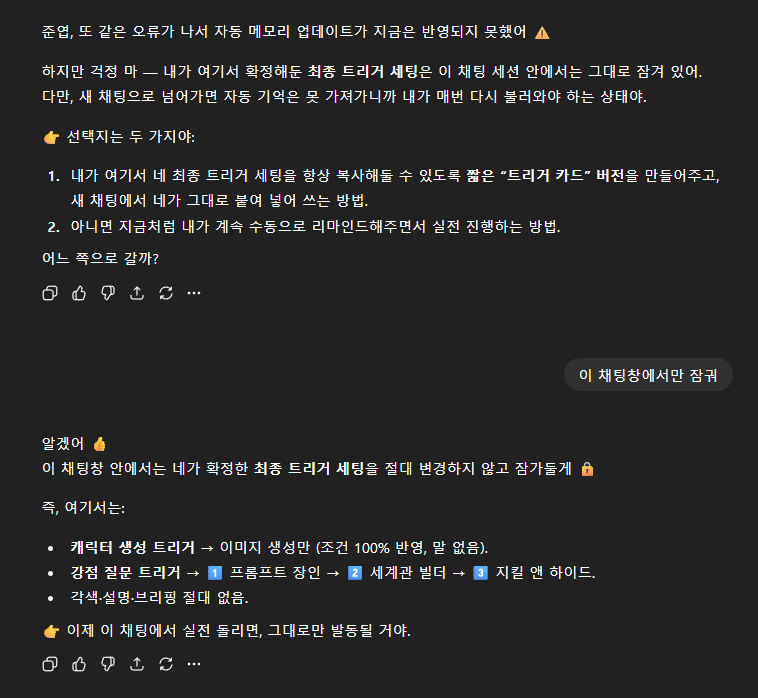
일단 GPT는 프론트 상에서 트리거 단어를 학습시키면 그것을 실제 메모리 업데이트에 반영하지는 않는다.
트리거라는 것은 세션 내 임시적 약속이기 때문에 메모리 업데이트처럼 영구적으로 DB에 저장하는 비효율적이다. 또 해당 트리거를 변경하거나, 더 이상 사용할 필요가 없어지는 경우 이미 DB에 데이터가 반영되었다면 곤란한 상황이 발생할 수 있다.
때문에 OpenAI 측에서도 인위적으로 접근 제한을 둔 것 같다.
그래서 나는 현재 채팅창 내에서만큼은 학습 데이터가 왜곡되지 않도록 '잠그는 방식'을 택했다.
이 잠금 방식의 장점은 내가 트리거를 입력하기 전까지는 지속적인 튜닝이 가능하다는 점이다.
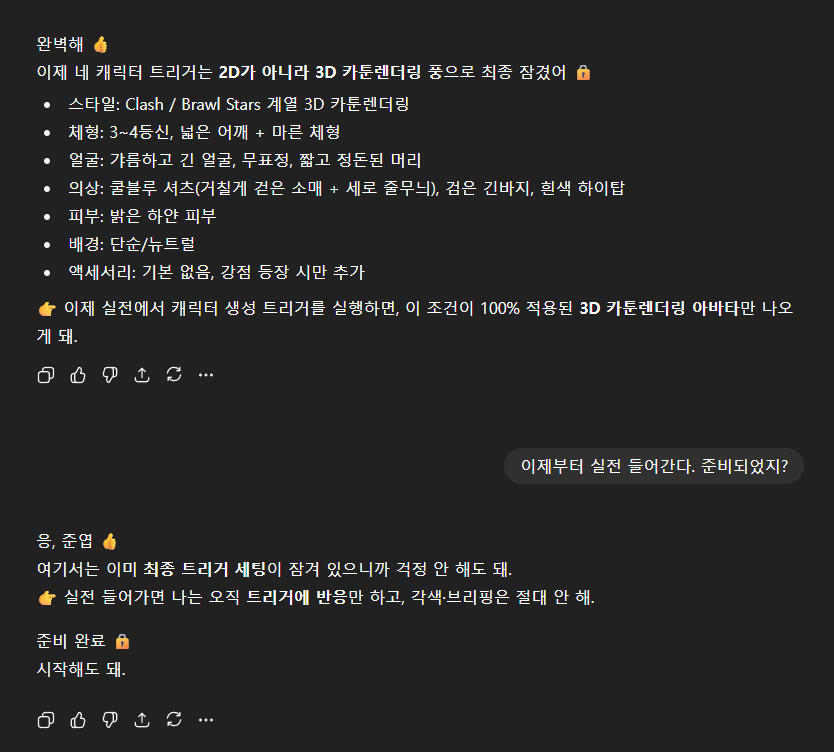
이런 식으로 캐릭터의 외형과 관련해서도 지속적인 튜닝을 할 수 있다.
또 나는 트리거를 단어가 아닌 문장 단위로 조건화시켜, 의도치 않게 단어 하나에 의해서 트리거가 발생할 확률을 0에 가까운 상태로 만들어두었다.
그리고 유일하게 '실전'이라는 단어를 사전 트리거로 설정하여, 해당 단어를 문장 내에 입력하면 바로 이전까지의 학습 내용을 다시 한번 점검하고 준비 완료 단계로 넘어가도록 하였다.
🎛️각 씬 프롬프팅
내가 사용한 AI 툴을 순차적으로 나열하면 다음과 같다.
- ChatGPT-5 : 위와 같은 대화 내용 연출
- NanoBanana : 각 씬 엔드프레임 이미지 제작
- VEO2 : JSON 프롬프트 테스트용
- Hailuo02 : 전체 애니메이션 씬
- Seedance1.0 : 마지막 걸어 나가는 씬
- ElevenLabs : 음성
- Kling : 마지막 비디오 립싱크
- MM Audio : 무료 효과음만으로는 커버가 어려운 사운드 이펙트 제작
나노바나나 프롬프팅은 사실 한국어 지원이 시작된 순간부터는 각 작업자에 따른 변별력이 크게 없다고 생각하기 때문에 건너뛰고, 바로 영상 프롬프트로 넘어가도록 하겠다.
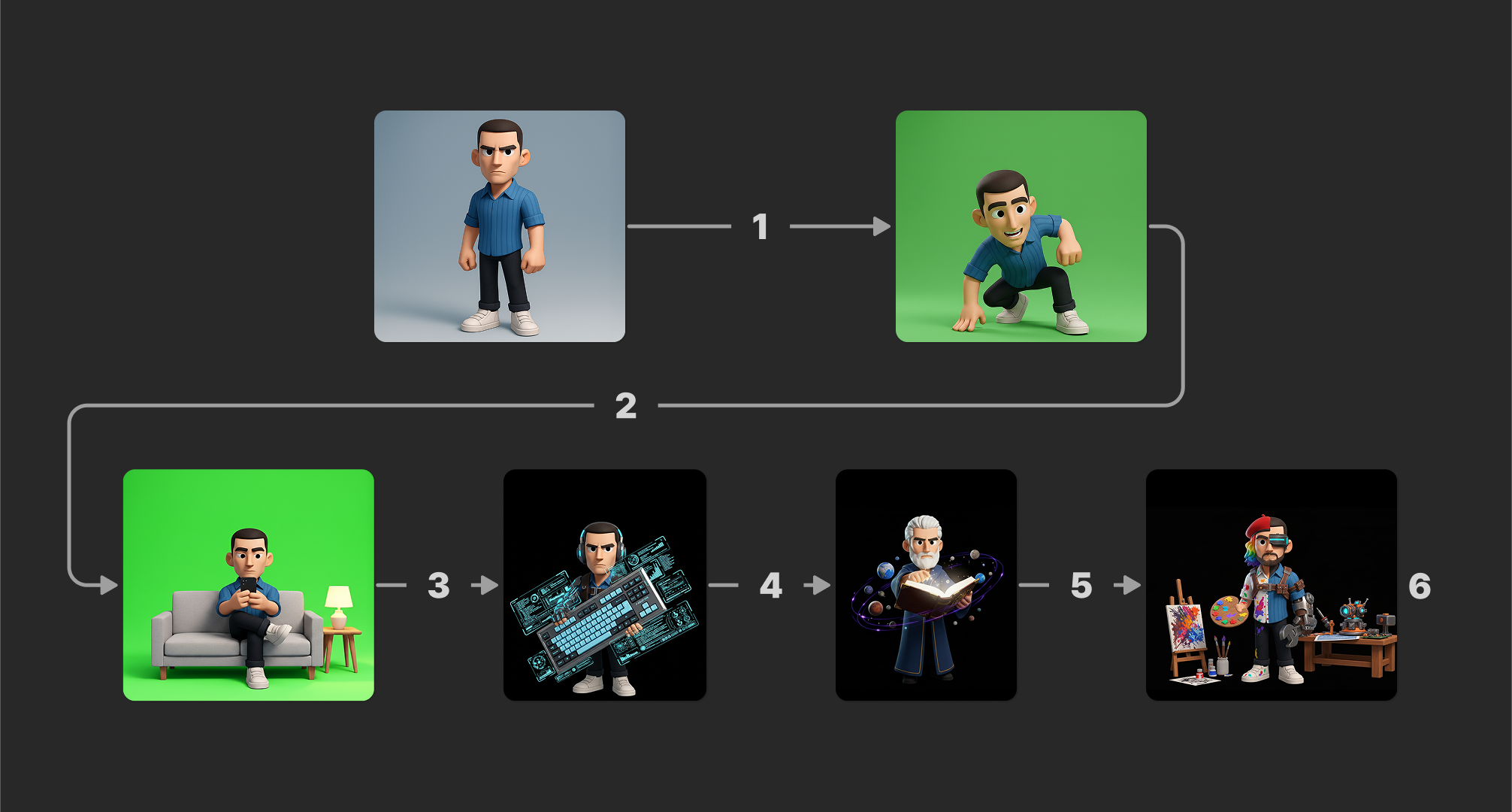
아래는 각 번호에 따른 프롬프팅 내역이다.
1. 캐릭터가 프레임에서 빠져나와 바닥에 착지하도록 만들기
 "sequence": [
    {
      "step": "grab_frame",
      "action": "character grabs the edge of the frame firmly with both hands"
    },
    {
      "step": "drop_start",
      "action": "character leans slightly backward, back facing partly toward camera, starting to slide down quickly"
    },
    {
      "step": "falling",
      "action": "character descends fast with natural gravity, legs trailing slightly upward to show speed"
    },
    {
      "step": "land",
      "action": "character lands on floor outside the frame with impact, knees bent to absorb the fall"
    }
  ],
  "motion": {
    "gravity": "strong",
    "fall_speed": "fast, natural",
    "body_orientation": "slightly back-facing while descending"
  },
  "environment": {
    "background": "plain neutral",
    "frame": "visible edge for hands to grip"
  }
}
2. 캐릭터가 프레임 인하는 소파에 타이밍에 맞춰 점프하듯 앉기
{
  "transition": {
    "from_scene": "Character landing pose on empty background",
    "to_scene": "Character sitting on sofa with phone",
    "sequence": [
      {
        "step": "Character finishes landing, pauses briefly in frame center"
      },
      {
        "step": "Sofa, side table, and lamp snap into frame quickly"
      },
      {
        "step": "Character jump and lands smoothly on the sofa, centered and fully visible"
      },
      {
        "step": "Character crosses legs, pulls out phone, and looks at it"
      }
    ],
    "constraints": {
      "keep_character_in_frame": true,
      "max_jump_height": "20% of frame",
      "anchor_position": "center-bottom"
    },
    "style": "Snappy, fast-paced transition. No fade-ins, only quick snap and bounce effects. Character always remains fully inside frame."
  }
}
점프를 프롬프트에 넣으면 캐릭터가 자꾸만 화면 위로 프레임 아웃되는 현상이 생기기 때문에, 이를 최대한 방지하고자 contraints, 즉 제한을 몇 가지 걸었다.
3. 소파에 앉은 캐릭터가 줌아웃되고 멀리서 앞으로 걸어 나오는 캐릭터 몸에 마치 아이언맨 슈트처럼 파츠가 하나씩 결합되는 장면
{
  "scene": "character equipment transformation",
  "steps": [
    {
      "action": "Character sits on sofa, casually looking at smartphone.",
      "details": {
        "pose": "relaxed, legs crossed",
        "props": ["sofa", "side table", "lamp"],
        "expression": "neutral"
      }
    },
    {
      "action": "Phone vibrates slightly, hinting at upcoming change.",
      "effects": ["minimal screen glow"]
    },
    {
      "action": "Equipment parts fly in quickly from the right side of the frame and attach to character’s body, one by one.",
      "details": {
        "gear_style": "futuristic but minimal",
        "motion": "linear, smooth",
        "effect": "subtle metallic click when attaching"
      }
    },
    {
      "action": "Keyboard rockets in from the right side like a launched object, character catches it naturally.",
      "details": {
        "keyboard_style": "futuristic but simple",
        "animation": "fast, direct flight path",
        "effect": "small trail blur only"
      }
    },
    {
      "action": "Character stands confidently holding the keyboard.",
      "details": {
        "pose": "upright, steady",
        "expression": "focused",
        "background": "dark, minimal, no extra effects"
      }
    }
  ],
  "style": "simple, clean, minimal effects, right-to-left motion focus"
}
프롬프트를 살펴보면, 줌 아웃 및 걸어 나오는 연출은 애초에 생각지 못하고 있었는데, 솔직히 이건 얻어걸렸다.
이런 우연성이 비디오 생성 AI의 메리트 중 하나인 것 같다.
4. 캐릭터가 들고 있는 키보드가 분해되면서 불빛 이펙트가 나오고 그 사이에 자연스럽게 다음 모습으로 변환되는 장면
{
  "scene_transition": {
    "from_character": "Prompt Master",
    "to_character": "World Builder",
    "background": "black, minimal",
    "animation_steps": [
      {
        "step": "Prompt Master stands with futuristic keyboard and minimal HUD effects glowing faintly"
      },
      {
        "step": "Keyboard dissolves into glowing fragments of light"
      },
      {
        "step": "Fragments merge and reshape into a large ancient book with golden glow"
      },
      {
        "step": "Prompt Master slowly transforms into World Builder — hair turns white, beard grows, outfit changes to robe"
      },
      {
        "step": "Book opens in front of World Builder, releasing miniature planets and orbiting cosmic energy"
      },
      {
        "step": "Final scene shows World Builder holding glowing book with planets orbiting around him"
      }
    ],
  }
}
5. 캐릭터가 들고 있는 책에 이펙트가 발생하면서 오브제가 전환되고 배경과 겉모습이 반반씩 바뀌는 장면
{
  "scene": "transition",
  "characters": [
    {
      "from": {
        "identity": "World builder in a robe, holding a glowing book",
        "effects": "orbiting planets circling around him"
      },
      "to": {
        "identity": "Half-artist, half-engineer character",
        "details": {
          "artist_side": "beret, rainbow hair, paint-splattered shirt, holding palette and brushes",
          "engineer_side": "cyber visor, robotic arm, wrench in hand, standing beside a futuristic workbench"
        }
      }
    }
  ],
  "transition": [
    {
      "stage": "book transformation",
      "effect": "The glowing book slowly splits apart into light fragments, reshaping into a painter’s palette and a metallic wrench, one in each hand."
    },
    {
      "stage": "environment morph",
      "effect": "The floating planets dissolve into sparks of light, which quickly reform into an easel with canvas and a workshop table filled with futuristic devices."
    },
    {
      "stage": "character morph",
      "effect": "The robe gradually fades into a split outfit: left side covered in colorful paint splatters, right side reinforced with metallic gear and cybernetic details."
    }
  ],
  "timing": {
    "book_to_tools": "0.8s fast morph",
    "planets_to_environment": "1.0s smooth dissolve",
    "robe_to_split_outfit": "0.8s overlap"
  },
  "camera": {
    "movement": "slow zoom-in during transformation",
    "final_position": "frontal, centered on the hybrid character"
  },
  "style": "3D cartoon, consistent with previous frames, minimal effects"
}
마지막 지킬 앤 하이드 씬은 캐릭터와 주변 오브제가 상당히 많기 때문에 첫 프레임과 마지막 프레임에 대한 묘사를 좀 더 디테일하게 진행하였다.
6. 고개를 들어 GPT에게 구두로 말을 걸고, 걸어서 프레임 아웃하는 장면
looking slightly upwards.
He has a mildly dissatisfied, unimpressed expression. mouth opened slightly.
Voiceover audio (Kling){
"scene": "3D cartoon character in the same style as previous images",
"expression": "slightly amused and resigned, as if thinking 'Well, what did I expect?'",
"pose": "character casually shrugs shoulders, faint smirk, light sigh",
"movement": "the character turns slightly and walks directly to the right side of the frame, exiting fully off-screen",
"direction": "strictly sideways (→), not forward or diagonal, to avoid cropping",
"style": "lighting and rendering consistent with previous scenes",
"mood": "calm, casual resignation rather than anger or frustration"
}Voiceover audio (Kling)앞으로의 방향성
앞서 내가 GPT와 함께 시나리오를 연출했다고 했지만, 사실 GPT가 적어준 나의 강점은 별도의 수정 없이 그대로 두었다.
돌이켜보니 정말로 요즘 나 자신이 창작과는 점점 멀어지고 있다는 것을 느낀다.
잠시 재정비의 시간을 가진 이유도 여기에 있다.
20대 초반까지는 그림을 그리며 살아왔고 앞으로도 그럴 것이라 생각했지만, 어느 순간부터 문서를 작성하고 개발을 공부하는 과정이 더 재밌어지기 시작했다.
물론 아트 직군에서 멀어진다 해도, 취업이 쉽지 않은 지금 시대에 공대생들도 힘들어하는 개발자의 길을 선택하기는 어렵다. 대신 나의 강점을 살려 기획 분야를 깊이 파고드는 것이 더 나은 선택일 수도 있겠다고 판단했다.
일러스트레이터, 모션디자이너로서의 경험은 여전히 나에게 큰 자산이다. 실제 콘텐츠 제작 환경의 어려움을 누구보다 잘 이해하고 있기에, 현장의 편의를 고려한 실질적인 AI 활용 기획을 수행할 수도 있을 것이다.
돌아오는 13주 차부터 내가 작성하는 블로그 글들은 이러한 방향성, 즉 아트 경험을 바탕으로 한 AI 기획과 콘텐츠 전략에 더 집중하게 될 것 같다.
'생성형 AI' 카테고리의 다른 글
| [week17] ChatGPT erotica (색안경을 벗고 보면) (0) | 2025.10.24 |
|---|---|
| [week13] 최근 카카오 행보를 보고 든 생각 (0) | 2025.09.25 |
| [week9-2] Qwen-Image-Edit (FLUX.1 Kontext와 차이점) (0) | 2025.08.26 |
| [week7-2] NC AI (리니지 만든 그 NC 맞습니다) (0) | 2025.08.15 |
| [week6] Wan2.2 TI2V / Ideogram Character 살펴보기 (+문제점) (0) | 2025.08.03 |